<!DOCTYPE html>
    <html lang="vi" xmlns="http://www.w3.org/1999/xhtml" prefix="og: http://ogp.me/ns#">
    <head>
<title>HƯỚNG DẪN CÁCH SỬA CHỮA MẠNG LAN</title>
<meta name="description" content="HƯỚNG DẪN CÁCH SỬA CHỮA MẠNG LAN - Savefile - Tin Tức - https&#x3A;&#x002F;&#x002F;hust.edu.vn&#x002F;vi&#x002F;news&#x002F;savefile&#x002F;tin-tuc-su-kien&#x002F;huong-dan-cach-sua-chua-mang-lan-599751.html">
<meta name="author" content="Đại học Bách khoa Hà Nội">
<meta name="copyright" content="Đại học Bách khoa Hà Nội [ccpr@hust.edu.vn]">
<meta name="google-site-verification" content="lpSvS2om85_DqFe7xgBMV-TvBFbuNGWvXNWeLtncZjM">
<meta name="generator" content="NukeViet v4.5">
<meta name="viewport" content="width=device-width, initial-scale=1">
<meta http-equiv="Content-Type" content="text/html; charset=utf-8">
<meta property="og:title" content="HƯỚNG DẪN CÁCH SỬA CHỮA MẠNG LAN">
<meta property="og:type" content="website">
<meta property="og:description" content="Savefile - Tin Tức - https&#x3A;&#x002F;&#x002F;hust.edu.vn&#x002F;vi&#x002F;news&#x002F;savefile&#x002F;tin-tuc-su-kien&#x002F;huong-dan-cach-sua-chua-mang-lan-599751.html">
<meta property="og:site_name" content="Đại học Bách khoa Hà Nội">
<meta property="og:url" content="https://hust.edu.vn/vi/news/savefile/tin-tuc-su-kien/huong-dan-cach-sua-chua-mang-lan-599751.html">
<link rel="shortcut icon" href="https://hust.edu.vn/uploads/sys/android-icon-36x36.png">
<link rel="canonical" href="https://hust.edu.vn/vi/news/savefile/tin-tuc-su-kien/huong-dan-cach-sua-chua-mang-lan-599751.html">
<link rel="alternate" href="https://hust.edu.vn/vi/news/rss/" title="Tin Tức" type="application/rss+xml">
<link rel="alternate" href="https://hust.edu.vn/vi/news/rss/hoat-dong-chung/" title="Tin Tức - Hoạt động chung" type="application/rss+xml">
<link rel="alternate" href="https://hust.edu.vn/vi/news/rss/cong-tac-dang-va-doan-the/" title="Tin Tức - Công tác Đảng và Đoàn thể" type="application/rss+xml">
<link rel="alternate" href="https://hust.edu.vn/vi/news/rss/tuyen-sinh-dao-tao-cong-tac-sinh-vien/" title="Tin Tức - Tuyển sinh - Đào tạo - Công tác sinh viên" type="application/rss+xml">
<link rel="alternate" href="https://hust.edu.vn/vi/news/rss/khoa-hoc-cong-nghe-dmst/" title="Tin Tức - Khoa học - Công nghệ - ĐMST" type="application/rss+xml">
<link rel="alternate" href="https://hust.edu.vn/vi/news/rss/hop-tac-doi-ngoai-truyen-thong/" title="Tin Tức - Hợp tác - Đối ngoại - Truyền thông" type="application/rss+xml">
<link rel="alternate" href="https://hust.edu.vn/vi/news/rss/kiem-dinh-xep-hang/" title="Tin Tức - Kiểm định - Xếp hạng" type="application/rss+xml">
<link rel="alternate" href="https://hust.edu.vn/vi/news/rss/to-chuc-nhan-su-tuyen-dung/" title="Tin Tức - Tổ chức - Nhân sự - Tuyển dụng" type="application/rss+xml">
<link rel="alternate" href="https://hust.edu.vn/vi/news/rss/bach-khoa-tren-bao-chi/" title="Tin Tức - Bách khoa trên Báo chí" type="application/rss+xml">
<link rel="alternate" href="https://hust.edu.vn/vi/news/rss/tin-tuc-su-kien/" title="Tin Tức - Tin tức - sự kiện" type="application/rss+xml">
<link rel="alternate" href="https://hust.edu.vn/vi/news/rss/tro-giup-can-bo/" title="Tin Tức - Trợ giúp Cán bộ" type="application/rss+xml">
<link rel="alternate" href="https://hust.edu.vn/vi/news/rss/tro-giup-sinh-vien/" title="Tin Tức - Trợ giúp Sinh viên" type="application/rss+xml">
<link rel="alternate" href="https://hust.edu.vn/vi/news/rss/su-kien-sap-dien-ra/" title="Tin Tức - Sự kiện sắp diễn ra" type="application/rss+xml">
<link rel="alternate" href="https://hust.edu.vn/vi/news/rss/cong-tac-sinh-vien/" title="Tin Tức - Công tác Sinh viên" type="application/rss+xml">
<link rel="alternate" href="https://hust.edu.vn/vi/news/rss/thong-bao-chung/" title="Tin Tức - Thông báo chung" type="application/rss+xml">
<link rel="alternate" href="https://hust.edu.vn/vi/news/rss/lich-cong-tac/" title="Tin Tức - Lịch công tác" type="application/rss+xml">
<link rel="alternate" href="https://hust.edu.vn/vi/news/rss/he-thong-phong-thi-nghiem/" title="Tin Tức - Hệ thống Phòng thí nghiệm" type="application/rss+xml">
<link rel="alternate" href="https://hust.edu.vn/vi/news/rss/hoi-dong-nganh-lien-nganh/" title="Tin Tức - Hội đồng Ngành - Liên ngành" type="application/rss+xml">
<link rel="alternate" href="https://hust.edu.vn/vi/news/rss/cac-truong-thanh-vien/" title="Tin Tức - Các trường thành viên" type="application/rss+xml">
<link rel="alternate" href="https://hust.edu.vn/vi/news/rss/so-huu-tri-tue/" title="Tin Tức - Sở hữu trí tuệ" type="application/rss+xml">
<link rel="alternate" href="https://hust.edu.vn/vi/news/rss/van-ban-phap-quy/" title="Tin Tức - Văn bản pháp quy" type="application/rss+xml">
<link rel="alternate" href="https://hust.edu.vn/vi/news/rss/thong-tin-huong-dan/" title="Tin Tức - Thông tin hướng dẫn" type="application/rss+xml">
<link rel="alternate" href="https://hust.edu.vn/vi/news/rss/cac-bieu-mau/" title="Tin Tức - Các biểu mẫu" type="application/rss+xml">
<link rel="alternate" href="https://hust.edu.vn/vi/news/rss/van-ban-quy-che/" title="Tin Tức - Văn bản quy chế" type="application/rss+xml">
<link rel="alternate" href="https://hust.edu.vn/vi/news/rss/cap-nha-nuoc/" title="Tin Tức - Cấp Nhà nước" type="application/rss+xml">
<link rel="alternate" href="https://hust.edu.vn/vi/news/rss/cap-bo/" title="Tin Tức - Cấp Bộ" type="application/rss+xml">
<link rel="alternate" href="https://hust.edu.vn/vi/news/rss/cap-truong/" title="Tin Tức - Cấp Trường" type="application/rss+xml">
<link rel="alternate" href="https://hust.edu.vn/vi/news/rss/ke-hoach-hoc-tap/" title="Tin Tức - Kế hoạch học tập" type="application/rss+xml">
<link rel="alternate" href="https://hust.edu.vn/vi/news/rss/thong-tin-van-bang/" title="Tin Tức - Thông tin văn bằng" type="application/rss+xml">
<link rel="alternate" href="https://hust.edu.vn/vi/news/rss/media/" title="Tin Tức - Media" type="application/rss+xml">
<link rel="alternate" href="https://hust.edu.vn/vi/news/rss/du-an-sahep/" title="Tin Tức - Dự án SAHEP" type="application/rss+xml">
<link rel="preload" as="style" href="https://hust.edu.vn/assets/css/font-awesome.min.css" type="text/css">
<link rel="preload" as="style" href="https://hust.edu.vn/themes/hust/css/animate.min.css" type="text/css">
<link rel="preload" as="style" href="https://hust.edu.vn/themes/hust/css/bootstrap.min.css" type="text/css">
<link rel="preload" as="style" href="https://hust.edu.vn/themes/hust/css/style.css" type="text/css">
<link rel="preload" as="style" href="https://hust.edu.vn/themes/hust/css/style.responsive.css" type="text/css">
<link rel="preload" as="style" href="https://hust.edu.vn/themes/default/css/news.css" type="text/css">
<link rel="preload" as="style" href="https://hust.edu.vn/themes/hust/css/custom.css" type="text/css">
<link rel="preload" as="style" href="https://hust.edu.vn/themes/hust/css/hust.css" type="text/css">
<link rel="preload" as="style" href="https://hust.edu.vn/themes/hust/css/custom70.css" type="text/css">
<link rel="preload" as="style" href="https://hust.edu.vn/themes/hust/css/custom_NCKH.css" type="text/css">
<link rel="preload" as="style" href="https://hust.edu.vn/assets/css/hust.vi.0.css" type="text/css">
<link rel="preload" as="style" href="https://hust.edu.vn/themes/hust/js/slick/slick.css" type="text/css">
<link rel="preload" as="style" href="https://hust.edu.vn/themes/hust/js/slick/slick-theme.css" type="text/css">
<link rel="preload" as="script" href="https://hust.edu.vn/assets/js/jquery/jquery.min.js" type="text/javascript">
<link rel="preload" as="script" href="https://hust.edu.vn/assets/js/language/vi.js" type="text/javascript">
<link rel="preload" as="script" href="https://hust.edu.vn/assets/js/DOMPurify/purify3.js" type="text/javascript">
<link rel="preload" as="script" href="https://hust.edu.vn/assets/js/global.js" type="text/javascript">
<link rel="preload" as="script" href="https://hust.edu.vn/assets/js/site.js" type="text/javascript">
<link rel="preload" as="script" href="https://hust.edu.vn/themes/default/js/news.js" type="text/javascript">
<link rel="preload" as="script" href="https://hust.edu.vn/themes/hust/js/main.js" type="text/javascript">
<link rel="preload" as="script" href="https://hust.edu.vn/themes/hust/js/custom.js" type="text/javascript">
<link rel="preload" as="script" href="https://hust.edu.vn/themes/hust/js/hust.js" type="text/javascript">
<link rel="preload" as="script" href="https://hust.edu.vn/themes/hust/js/slick/slick.js" type="text/javascript">
<link rel="preload" as="script" href="https://www.googletagmanager.com/gtag/js?id=G-PNQVF6LTL9" type="text/javascript">
<link rel="preload" as="script" href="https://hust.edu.vn/themes/hust/js/bootstrap.min.js" type="text/javascript">
<link rel="stylesheet" href="https://hust.edu.vn/assets/css/font-awesome.min.css">
<link rel="stylesheet" href="https://hust.edu.vn/themes/hust/css/animate.min.css">
<link rel="stylesheet" href="https://hust.edu.vn/themes/hust/css/bootstrap.min.css">
<link rel="stylesheet" href="https://hust.edu.vn/themes/hust/css/style.css">
<link rel="stylesheet" href="https://hust.edu.vn/themes/hust/css/style.responsive.css">
<link rel="StyleSheet" href="https://hust.edu.vn/themes/default/css/news.css">
<link rel="stylesheet" href="https://hust.edu.vn/themes/hust/css/custom.css">
<link rel="stylesheet" href="https://hust.edu.vn/themes/hust/css/hust.css">
<link rel="stylesheet" href="https://hust.edu.vn/themes/hust/css/custom70.css">
<link rel="stylesheet" href="https://hust.edu.vn/themes/hust/css/custom_NCKH.css">
<link rel="stylesheet" href="https://hust.edu.vn/assets/css/hust.vi.0.css">
<link rel="stylesheet" href="https://hust.edu.vn/themes/hust/js/slick/slick.css" />
<link rel="stylesheet" href="https://hust.edu.vn/themes/hust/js/slick/slick-theme.css" />
<style type="text/css">
	body{background: #fff;}
</style>
</head>
    <body>
<div id="print">
	<div id="hd_print">
		<h2 class="pull-left">Đại học Bách khoa Hà Nội</h2>
		<p class="pull-right"><a title="Đại học Bách khoa Hà Nội" href="https://hust.edu.vn/">https://hust.edu.vn</a></p>
	</div>
	<div class="clear"></div>
	<hr />
	<div id="content">
		<h1>HƯỚNG DẪN CÁCH SỬA CHỮA MẠNG LAN</h1>
		<ul class="list-inline">
			<li>Chủ nhật - 24/10/2021 14:48</li>
			<li class="hidden-print txtrequired"><em class="fa fa-print">&nbsp;</em><a title="In ra" href="javascript:;" onclick="window.print()">In ra</a></li>
			<li class="hidden-print txtrequired"><em class="fa fa-power-off">&nbsp;</em><a title="Đóng cửa sổ này" href="javascript:;" onclick="window.close()">Đóng cửa sổ này</a></li>
		</ul>
		<div class="clear"></div>
		<div id="hometext">
		</div>
		<div id="bodytext" class="clearfix">
			<h2 style="box-sizing: border-box; margin-top: 0px; color: rgb(34, 34, 34); font-family: Arial, Helvetica, sans-serif;"><span style="box-sizing: border-box; font-size: 14pt; font-family: &quot;times new roman&quot;, times;">Các bước Sửa Chữa Mạng Lan Nhanh Nhất</span></h2>

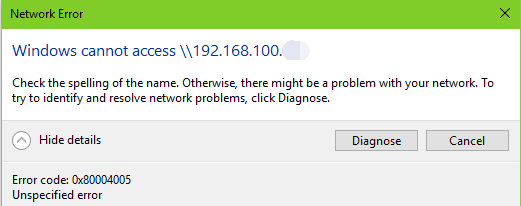
<p style="box-sizing: border-box; color: rgb(34, 34, 34); font-family: Arial, Helvetica, sans-serif;"><span style="box-sizing: border-box; font-size: 12pt; font-family: &quot;times new roman&quot;, times;">Làm thế nào để sửa chữa không có truy cập mạng LAN trong Windows 10 ? Sau khi nâng cấp windows 10, nhiều người dùng bắt đầu gặp sự cố kết nối mạng LAN (Local Area Network). Trong trường hợp này, Internet của bạn hoạt động bình thường, nhưng khi ánh xạ ổ đĩa mạng hoặc thư mục dùng chung, bạn chỉ nhận được lỗi "Windows không thể truy cập vào mạng LAN":</span></p>

<p style="box-sizing: border-box; color: rgb(34, 34, 34); font-family: Arial, Helvetica, sans-serif; text-align: center;"><span style="box-sizing: border-box; font-size: 12pt; font-family: &quot;times new roman&quot;, times;"><img alt="" src="https://hust.edu.vn/uploads/sys/news/2021/10/0705-huong-dan-cach-sua-chua-mang-lan.518511.27775.png" style="height: 237px; width: 600px;" /></span></p>

<p style="box-sizing: border-box; color: rgb(34, 34, 34); font-family: Arial, Helvetica, sans-serif; text-align: center;">&nbsp;</p>

<p style="box-sizing: border-box; color: rgb(34, 34, 34); font-family: Arial, Helvetica, sans-serif;"><span style="box-sizing: border-box; font-size: 12pt; font-family: &quot;times new roman&quot;, times;">Có nhiều yếu tố dẫn đến vấn đề LAN không hoạt động: vấn đề phần cứng, bộ điều hợp LAN bị lỗi, cấu hình mạng sai,...</span></p>

<h2 style="box-sizing: border-box; margin-top: 0px; color: rgb(34, 34, 34); font-family: Arial, Helvetica, sans-serif;"><span style="box-sizing: border-box; font-size: 14pt; font-family: &quot;times new roman&quot;, times;">Hôm nay chúng tôi sẽ&nbsp;Hướng Dẫn Cách Sửa Chữa Mạng Lan cho bạn và một số phương pháp khắc phục sự cố không có mạng LAN.</span></h2>

<p style="box-sizing: border-box; color: rgb(34, 34, 34); font-family: Arial, Helvetica, sans-serif;"><span style="box-sizing: border-box; font-size: 14pt;"><strong style="box-sizing: border-box;"><span style="box-sizing: border-box; font-family: &quot;times new roman&quot;, times;">1. Kiểm tra phần cứng liên quan đến kết nối mạng LAN</span></strong></span></p>

<p style="box-sizing: border-box; color: rgb(34, 34, 34); font-family: Arial, Helvetica, sans-serif;"><span style="box-sizing: border-box; font-size: 12pt; font-family: &quot;times new roman&quot;, times;">Bạn có thể kiểm tra phần cứng liên quan đến mạng LAN trước tiên trong trường hợp bạn lãng phí thời gian vào các hoạt động máy tính vô dụng khác.</span></p>

<p style="box-sizing: border-box; color: rgb(34, 34, 34); font-family: Arial, Helvetica, sans-serif;"><span style="box-sizing: border-box; font-size: 12pt; font-family: &quot;times new roman&quot;, times;">Bước 1. Liên hệ với bộ phận hỗ trợ mạng nội bộ của bạn và đảm bảo không có sự cố với mạng.</span></p>

<p style="box-sizing: border-box; color: rgb(34, 34, 34); font-family: Arial, Helvetica, sans-serif;"><span style="box-sizing: border-box; font-size: 12pt; font-family: &quot;times new roman&quot;, times;">Bước 2. Tắt rồi bật lại bộ định tuyến WiFi, hoặc rút cáp Ethernet ra và sau đó kết nối lại. Điều này sẽ giúp router tìm lại địa chỉ IP.</span></p>

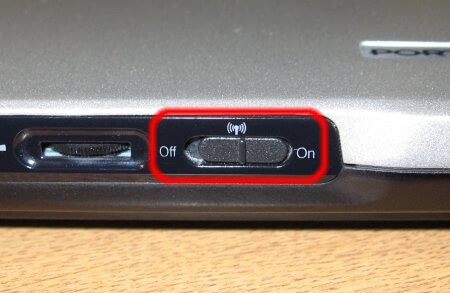
<p style="box-sizing: border-box; color: rgb(34, 34, 34); font-family: Arial, Helvetica, sans-serif;"><span style="box-sizing: border-box; font-size: 12pt; font-family: &quot;times new roman&quot;, times;">Bước 3. Chuyển nút không dây trên máy tính xách tay của bạn. Tắt nó đi và bật lại.</span></p>

<p style="box-sizing: border-box; color: rgb(34, 34, 34); font-family: Arial, Helvetica, sans-serif;"><span style="box-sizing: border-box; font-size: 12pt; font-family: &quot;times new roman&quot;, times;">Bước 4. Dọn dẹp bụi bẩn&nbsp;và cắm lại card mạng trong cổng.</span></p>

<p style="box-sizing: border-box; color: rgb(34, 34, 34); font-family: Arial, Helvetica, sans-serif; text-align: center;"><span style="box-sizing: border-box; font-size: 12pt; font-family: &quot;times new roman&quot;, times;"><img alt="" src="https://hust.edu.vn/uploads/sys/news/2021/10/0705-huong-dan-cach-sua-chua-mang-lan-7.518511.27776.png" style="height: 391px; width: 600px;" /></span></p>

<p style="box-sizing: border-box; color: rgb(34, 34, 34); font-family: Arial, Helvetica, sans-serif;"><span style="box-sizing: border-box; font-size: 12pt; font-family: &quot;times new roman&quot;, times;">Sau khi kiểm tra phần cứng, hãy kết nối lại mạng LAN để xem bạn có thể&nbsp;truy cập&nbsp;mạng hoặc thư mục được chia sẻ hay không.&nbsp;Nếu sự cố kết nối mạng LAN vẫn còn, hãy tiếp&nbsp;tục các bưới dưới đây:</span></p>

<p style="box-sizing: border-box; color: rgb(34, 34, 34); font-family: Arial, Helvetica, sans-serif;"><span style="box-sizing: border-box; font-size: 12pt; font-family: &quot;times new roman&quot;, times;"><strong style="box-sizing: border-box;"><span style="box-sizing: border-box; font-size: 14pt;">2. Sửa đổi cài đặt mạng liên quan đến mạng LAN</span></strong><br style="box-sizing: border-box;" />
Bật tính năng chia sẻ tệp, máy in và bật tài khoản khách sẽ hữu ích khi khắc phục sự cố “Windows 10 không thể truy cập vào mạng LAN”.</span></p>

<p style="box-sizing: border-box; color: rgb(34, 34, 34); font-family: Arial, Helvetica, sans-serif;"><span style="box-sizing: border-box; font-size: 12pt; font-family: &quot;times new roman&quot;, times;">Bước 1. Bật Chia sẻ tệp và máy in<br style="box-sizing: border-box;" />
a. Nhấp chuột phải vào biểu tượng mạng trong vùng thông báo.</span></p>

<p style="box-sizing: border-box; color: rgb(34, 34, 34); font-family: Arial, Helvetica, sans-serif;"><span style="box-sizing: border-box; font-size: 12pt; font-family: &quot;times new roman&quot;, times;">b. Chọn&nbsp;<strong style="box-sizing: border-box;">Open Network and Sharing Center</strong>.</span></p>

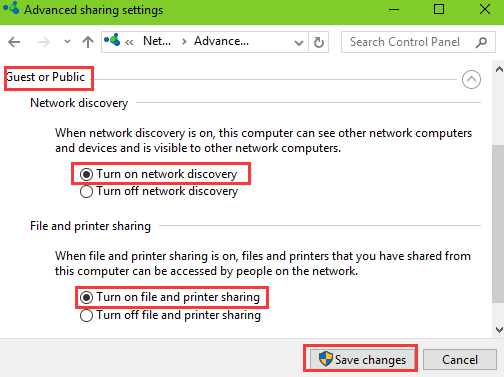
<p style="box-sizing: border-box; color: rgb(34, 34, 34); font-family: Arial, Helvetica, sans-serif;"><span style="box-sizing: border-box; font-size: 12pt; font-family: &quot;times new roman&quot;, times;">c. Chọn&nbsp;<strong style="box-sizing: border-box;">Change advanced sharing settings</strong>&nbsp;từ cột bên trái.</span></p>

<p style="box-sizing: border-box; color: rgb(34, 34, 34); font-family: Arial, Helvetica, sans-serif;"><span style="box-sizing: border-box; font-size: 12pt; font-family: &quot;times new roman&quot;, times;">d. Mở rộng&nbsp;<strong style="box-sizing: border-box;">Guest or public.</strong></span></p>

<p style="box-sizing: border-box; color: rgb(34, 34, 34); font-family: Arial, Helvetica, sans-serif;"><span style="box-sizing: border-box; font-size: 12pt; font-family: &quot;times new roman&quot;, times;">e. Chọn&nbsp;<strong style="box-sizing: border-box;">Turn on network discovery</strong>&nbsp;và&nbsp;<strong style="box-sizing: border-box;">Turn on file and printer sharing.</strong></span></p>

<p style="box-sizing: border-box; color: rgb(34, 34, 34); font-family: Arial, Helvetica, sans-serif; text-align: center;"><img alt="" src="https://hust.edu.vn/uploads/sys/news/2021/10/0705-huong-dan-cach-sua-chua-mang-lan-2.518511.27777.png" style="height: 449px; width: 600px;" /></p>

<p style="box-sizing: border-box; color: rgb(34, 34, 34); font-family: Arial, Helvetica, sans-serif;"><span style="box-sizing: border-box; font-size: 12pt; font-family: &quot;times new roman&quot;, times;">Lưu các thay đổi và chuyển sang Bước 2 bên dưới.</span></p>

<p style="box-sizing: border-box; color: rgb(34, 34, 34); font-family: Arial, Helvetica, sans-serif;"><span style="box-sizing: border-box; font-size: 12pt; font-family: &quot;times new roman&quot;, times;">Bước 2. Cho phép tài khoản khách</span></p>

<p style="box-sizing: border-box; color: rgb(34, 34, 34); font-family: Arial, Helvetica, sans-serif;"><span style="box-sizing: border-box; font-size: 12pt; font-family: &quot;times new roman&quot;, times;">Sử dụng&nbsp;các phím tắt Windows&nbsp;<strong style="box-sizing: border-box;">Win + R</strong>&nbsp;để khởi động&nbsp;<strong style="box-sizing: border-box;">Run</strong>&nbsp;.</span></p>

<p style="box-sizing: border-box; color: rgb(34, 34, 34); font-family: Arial, Helvetica, sans-serif;"><span style="box-sizing: border-box; font-size: 12pt; font-family: &quot;times new roman&quot;, times;">b.&nbsp;Nhập vào&nbsp;<strong style="box-sizing: border-box;">regedit</strong>&nbsp;.</span></p>

<p style="box-sizing: border-box; color: rgb(34, 34, 34); font-family: Arial, Helvetica, sans-serif;"><span style="box-sizing: border-box; font-size: 12pt; font-family: &quot;times new roman&quot;, times;">c.&nbsp;Nhấn Enter để mở&nbsp;<strong style="box-sizing: border-box;">Registry Editor</strong>&nbsp;.</span></p>

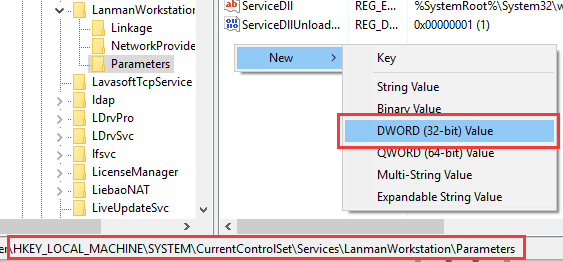
<p style="box-sizing: border-box; color: rgb(34, 34, 34); font-family: Arial, Helvetica, sans-serif;"><span style="box-sizing: border-box; font-size: 12pt; font-family: &quot;times new roman&quot;, times;">d.&nbsp;Điều hướng đến đường dẫn sau:&nbsp;<strong style="box-sizing: border-box;">HKEY_LOCAL_MACHINE \ SYSTEM \ CurrentControlSet \ Services \ LanmanWorkstation \ Parameters</strong></span></p>

<p style="box-sizing: border-box; color: rgb(34, 34, 34); font-family: Arial, Helvetica, sans-serif;"><span style="box-sizing: border-box; font-size: 12pt; font-family: &quot;times new roman&quot;, times;">e.&nbsp;Nhấp chuột phải vào vùng trống từ cột bên phải và chọn&nbsp;<strong style="box-sizing: border-box;">New.</strong></span></p>

<p style="box-sizing: border-box; color: rgb(34, 34, 34); font-family: Arial, Helvetica, sans-serif;"><span style="box-sizing: border-box; font-size: 12pt; font-family: &quot;times new roman&quot;, times;">f.&nbsp;Chọn&nbsp;<strong style="box-sizing: border-box;">DWORD (32-bit) Value</strong>.</span></p>

<div style="text-align: center;"><img alt="" src="https://hust.edu.vn/uploads/sys/news/2021/10/0705-huong-dan-cach-sua-chua-mang-lan-3.518511.27778.png" /></div>

<p>&nbsp;</p>

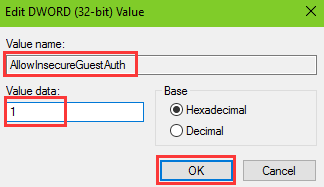
<div><span style="color: rgb(34, 34, 34); font-family: &quot;times new roman&quot;, times; font-size: 16px;">g.&nbsp;Đổi tên DWORD thành&nbsp;</span><strong style="box-sizing: border-box; color: rgb(34, 34, 34); font-family: &quot;times new roman&quot;, times; font-size: 16px;">AllowInsecureGuestAuth</strong><span style="color: rgb(34, 34, 34); font-family: &quot;times new roman&quot;, times; font-size: 16px;">&nbsp;và đặt giá trị là&nbsp;</span><strong style="box-sizing: border-box; color: rgb(34, 34, 34); font-family: &quot;times new roman&quot;, times; font-size: 16px;">1</strong><span style="color: rgb(34, 34, 34); font-family: &quot;times new roman&quot;, times; font-size: 16px;">&nbsp;.</span></div>

<p>&nbsp;</p>

<div style="text-align: center;"><img alt="" src="https://hust.edu.vn/uploads/sys/news/2021/10/0705-huong-dan-cach-sua-chua-mang-lan-4.518511.27779.png" /></div>

<div style="text-align: center;">&nbsp;</div>

<p>&nbsp;</p>

<p style="box-sizing: border-box; color: rgb(34, 34, 34); font-family: Arial, Helvetica, sans-serif;"><span style="box-sizing: border-box; font-size: 12pt; font-family: &quot;times new roman&quot;, times;">h.&nbsp;Nhấp vào&nbsp;<strong style="box-sizing: border-box;">OK</strong>&nbsp;để hoàn tất cài đặt.</span></p>

<p style="box-sizing: border-box; color: rgb(34, 34, 34); font-family: Arial, Helvetica, sans-serif;"><span style="box-sizing: border-box; font-size: 12pt; font-family: &quot;times new roman&quot;, times;"><strong style="box-sizing: border-box;">Chú ý:&nbsp;</strong>Bạn nên cẩn thận hơn khi sửa đổi Registry, bởi vì nó là một cơ sở dữ liệu hệ thống cực kỳ nhạy cảm.&nbsp;Nếu có vấn đề gì đó nghiêm trọng, chẳng hạn&nbsp;<strong style="box-sizing: border-box;">100% disk usage, slow boot, system restore error 0x8000ffff,...</strong>. sẽ làm phiền bạn và làm cho PC của bạn ngừng hoạt động hoàn toàn.</span></p>

<p style="box-sizing: border-box; color: rgb(34, 34, 34); font-family: Arial, Helvetica, sans-serif;"><span style="box-sizing: border-box; font-size: 12pt; font-family: &quot;times new roman&quot;, times;">Bạn nên&nbsp;<strong style="box-sizing: border-box;">tạo điểm khôi phục hệ thống</strong>&nbsp;trước khi có bất kỳ thay đổi nào liên quan đến sự cố mạng LAN.</span></p>

<h3 style="box-sizing: border-box; margin-top: 0px; color: rgb(34, 34, 34); font-family: Arial, Helvetica, sans-serif;"><span style="box-sizing: border-box; font-size: 12pt; font-family: &quot;times new roman&quot;, times;">Bước 3. Kích hoạt dịch vụ máy chủ</span></h3>

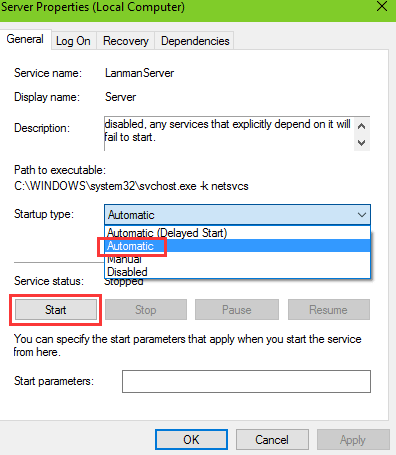
<p style="box-sizing: border-box; color: rgb(34, 34, 34); font-family: Arial, Helvetica, sans-serif;"><span style="box-sizing: border-box; font-size: 12pt; font-family: &quot;times new roman&quot;, times;">a.&nbsp;Mở&nbsp;<strong style="box-sizing: border-box;">Windows Services.</strong></span></p>

<p style="box-sizing: border-box; color: rgb(34, 34, 34); font-family: Arial, Helvetica, sans-serif;"><span style="box-sizing: border-box; font-size: 12pt; font-family: &quot;times new roman&quot;, times;">b.&nbsp;Điều hướng đến&nbsp;<strong style="box-sizing: border-box;">Server</strong>&nbsp;service.</span></p>

<p style="box-sizing: border-box; color: rgb(34, 34, 34); font-family: Arial, Helvetica, sans-serif;"><span style="box-sizing: border-box; font-size: 12pt; font-family: &quot;times new roman&quot;, times;">c.&nbsp;Bấm đúp vào&nbsp;<strong style="box-sizing: border-box;">Máy chủ</strong>&nbsp;.</span></p>

<p style="box-sizing: border-box; color: rgb(34, 34, 34); font-family: Arial, Helvetica, sans-serif;"><span style="box-sizing: border-box; font-size: 12pt; font-family: &quot;times new roman&quot;, times;">d.&nbsp;Nhấp vào nút&nbsp;<strong style="box-sizing: border-box;">Start</strong>&nbsp;.</span></p>

<p style="box-sizing: border-box; color: rgb(34, 34, 34); font-family: Arial, Helvetica, sans-serif;"><span style="box-sizing: border-box; font-size: 12pt; font-family: &quot;times new roman&quot;, times;">e.&nbsp;Chọn&nbsp;<strong style="box-sizing: border-box;">Automatic</strong>&nbsp;từ trình đơn thả xuống của&nbsp;menu&nbsp;<strong style="box-sizing: border-box;">Startup type</strong>.</span></p>

<p style="box-sizing: border-box; color: rgb(34, 34, 34); font-family: Arial, Helvetica, sans-serif; text-align: center;"><span style="box-sizing: border-box; font-size: 12pt; font-family: &quot;times new roman&quot;, times;"><img alt="" src="https://hust.edu.vn/uploads/sys/news/2021/10/0705-huong-dan-cach-sua-chua-mang-lan-5.518511.27780.png" style="height: 689px; width: 450px;" /></span></p>

<p style="box-sizing: border-box; color: rgb(34, 34, 34); font-family: Arial, Helvetica, sans-serif;"><span style="box-sizing: border-box; font-size: 12pt; font-family: &quot;times new roman&quot;, times;">f.&nbsp;Nhấp vào nút&nbsp;<strong style="box-sizing: border-box;">Apply</strong>&nbsp;và&nbsp;<strong style="box-sizing: border-box;">OK</strong>&nbsp;để hoàn tất cài đặt.</span></p>

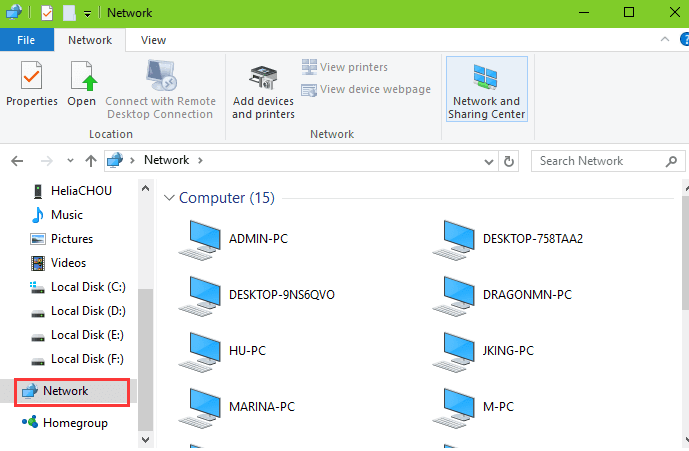
<p style="box-sizing: border-box; color: rgb(34, 34, 34); font-family: Arial, Helvetica, sans-serif;"><span style="box-sizing: border-box; font-size: 12pt; font-family: &quot;times new roman&quot;, times;">Khi bạn hoàn thành 3 bước, hãy mở&nbsp;<strong style="box-sizing: border-box;">Network</strong>.&nbsp;Bây giờ bạn sẽ thấy các thiết bị như máy tính, máy in, bộ định tuyến,... xuất hiện trong mạng cục bộ và mạng LAN khả dụng.</span></p>

<div style="text-align: center;"><img alt="" src="https://hust.edu.vn/uploads/sys/news/2021/10/0705-huong-dan-cach-sua-chua-mang-lan-6.518511.27781.png" style="height: 393px; width: 600px;" /></div>

<p>&nbsp;</p>

<div style="text-align: justify;">Nguồn: <a href="https://www.maytinhphunggia.vn/huong-dan-cach-sua-chua-mang-lan.html?fbclid=IwAR3QMNvmHlkxvdQzPXNcuXL8rrqlmARNLSQvhYX1GuwKtHOLVUOtg3L6R50">Internet</a></div>

<p>&nbsp;</p>
		</div>
				<div id="author">
						<p>
				<strong>Tác giả:</strong>
				<a href="https://hust.edu.vn/vi/news/author/anhnguyenkim/">Nguyễn Kim Anh</a>
			</p>
		</div>
	</div>
	<div id="footer" class="clearfix">
		<div id="url">
			<strong>URL của bản tin này: </strong><a href="https://hust.edu.vn/vi/news/savefile/tin-tuc-su-kien/huong-dan-cach-sua-chua-mang-lan-599751.html" title="HƯỚNG DẪN CÁCH SỬA CHỮA MẠNG LAN">https://hust.edu.vn/vi/news/savefile/tin-tuc-su-kien/huong-dan-cach-sua-chua-mang-lan-599751.html</a>

		</div>
		<div class="clear"></div>
		<div class="copyright">
			&copy; Đại học Bách khoa Hà Nội
		</div>
		<div id="contact">
			<a href="mailto:ccpr@hust.edu.vn">ccpr@hust.edu.vn</a>
		</div>
	</div>
</div>
        <div id="timeoutsess" class="chromeframe">
            Bạn đã không sử dụng Site, <a onclick="timeoutsesscancel();" href="https://hust.edu.vn/#">Bấm vào đây để duy trì trạng thái đăng nhập</a>. Thời gian chờ: <span id="secField"> 60 </span> giây
        </div>
        <div id="openidResult" class="nv-alert" style="display:none"></div>
        <div id="openidBt" data-result="" data-redirect=""></div>
<div id="run_cronjobs" style="visibility:hidden;display:none;"><img alt="cron" src="/index.php?second=cronjobs&amp;p=z1dESA26" width="1" height="1" /></div>
<script src="https://hust.edu.vn/assets/js/jquery/jquery.min.js"></script>
<script>var nv_base_siteurl="/",nv_lang_data="vi",nv_lang_interface="vi",nv_name_variable="nv",nv_fc_variable="op",nv_lang_variable="language",nv_module_name="news",nv_func_name="savefile",nv_is_user=0, nv_my_ofs=-4,nv_my_abbr="EDT",nv_cookie_prefix="nv4s_c523Wo",nv_check_pass_mstime=1738000,nv_area_admin=0,nv_safemode=0,theme_responsive=1,nv_recaptcha_ver=2,nv_recaptcha_sitekey="6Ld5WCEiAAAAAJr6hIEOr3bZf2m-LopszjRVYBWz",nv_recaptcha_type="image",XSSsanitize=1;</script>
<script src="https://hust.edu.vn/assets/js/language/vi.js"></script>
<script src="https://hust.edu.vn/assets/js/DOMPurify/purify3.js"></script>
<script src="https://hust.edu.vn/assets/js/global.js"></script>
<script src="https://hust.edu.vn/assets/js/site.js"></script>
<script src="https://hust.edu.vn/themes/default/js/news.js"></script>
<script src="https://hust.edu.vn/themes/hust/js/main.js"></script>
<script src="https://hust.edu.vn/themes/hust/js/custom.js"></script>
<script src="https://hust.edu.vn/themes/hust/js/hust.js"></script>
<script src="https://hust.edu.vn/themes/hust/js/slick/slick.js"></script>
<script type="application/ld+json">
        {
            "@context": "https://schema.org",
            "@type": "Organization",
            "url": "https://hust.edu.vn",
            "logo": "https://hust.edu.vn/uploads/sys/logo-dhbk-1-02_130_191.png"
        }
        </script>
<script async src="https://www.googletagmanager.com/gtag/js?id=G-PNQVF6LTL9"></script>
<script>window.dataLayer=window.dataLayer||[];function gtag(){dataLayer.push(arguments)}gtag('js',new Date);gtag('config','G-PNQVF6LTL9');</script>
<script src="https://hust.edu.vn/themes/hust/js/bootstrap.min.js"></script>
</body>
</html>